Building Metron with Claude as My Pair Programmer
I recently found myself with a familiar problem that most retail investors in India run into — my investments were everywhere. Direct equity in Zerodha, a few positions in an old demat account I never fully migrated from, mutual fund SIPs on yet another platform, some physical gold, and fixed deposits scattered across banks. Every time I wanted to understand where I actually stood financially, I had to open four or five apps and mentally stitch together a picture that none of them could give me on their own.
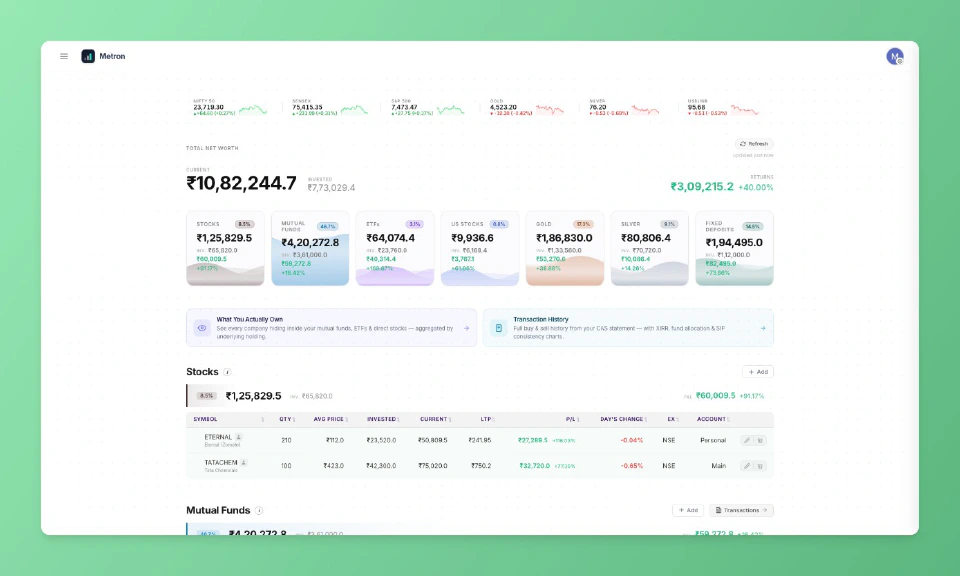
Zerodha Console and a few other apps offer a consolidated view, but I found them limited. What I really wanted was a single dashboard — stocks, ETFs, mutual funds, SIPs, physical gold, fixed deposits — with real P&L metrics computed.
So I reached out to Claude and asked it to write me a Python script.
- Metron is live at metron.thecoducer.com
How it started?#
The first version was a script and nothing more. It connected to Zerodha’s KiteConnect API to pull my equity and mutual fund holdings, read my physical gold and FD data from a Google Sheet I was already maintaining to track those assets, and rendered everything into a simple dashboard. The whole thing came together in an afternoon and it did exactly what I needed.
That should have been the end of it, but the nature of side projects is that they rarely stay small once you start using them daily. Within a week I found myself wanting sector exposure analysis to understand which industries I was overweight in, and then company-level breakdowns across asset classes because if I own Reliance stock directly and also hold a mutual fund with significant Reliance exposure, I wanted to know my true concentration. Then I wanted to parse CAMS Consolidated Account Statements to import mutual fund transaction history, and around the same time a couple of friends saw the dashboard and asked if they could use it too.
The script needed to become an application, and that transition gave me an opportunity I had been looking for — a chance to really understand how capable AI is at building production software. Not in demos or toy examples, but in the messy reality of a real project with auth flows, encrypted credential storage, background jobs, and a frontend that other people would actually use.
Tech stack and architecture#
Every technology choice was driven by the same question: what is the simplest option that adequately solves the problem?
- Flask for the backend — minimal and enough for a dashboard serving a small user base.
- Vanilla HTML, CSS, and JavaScript for the frontend — no React, no Vue, no build step. Claude turned out to be remarkably effective at writing vanilla frontend code, and fewer abstraction layers made debugging significantly easier.
- Google Sheets as the database — each user’s portfolio data lives in a Google Sheet in their own Google Drive. No centralised database of financial data, no liability. The tradeoff (no joins, no ACID) is acceptable when each user’s data is independent and reads vastly outnumber writes.
- Firestore stores only user profile info and encrypted broker API credentials. No portfolio data touches it.
- Redis for both market data caching (gold prices, instrument mappings, MF NAVs, sector classifications) and as a job queue via Redis Queue.
- Cloudflare Tunnel for internet access. Metron initially ran on Google Cloud, but the billing kept adding up for a personal project, so I moved the entire setup to a spare PC at home. My custom sub-domain resolves to Cloudflare tunnel that routes traffic to local server running at my home. Hosting cost is now zero.
The entire application runs as a single Gunicorn worker with eight threads, a single Redis instance, and a single RQ worker process.
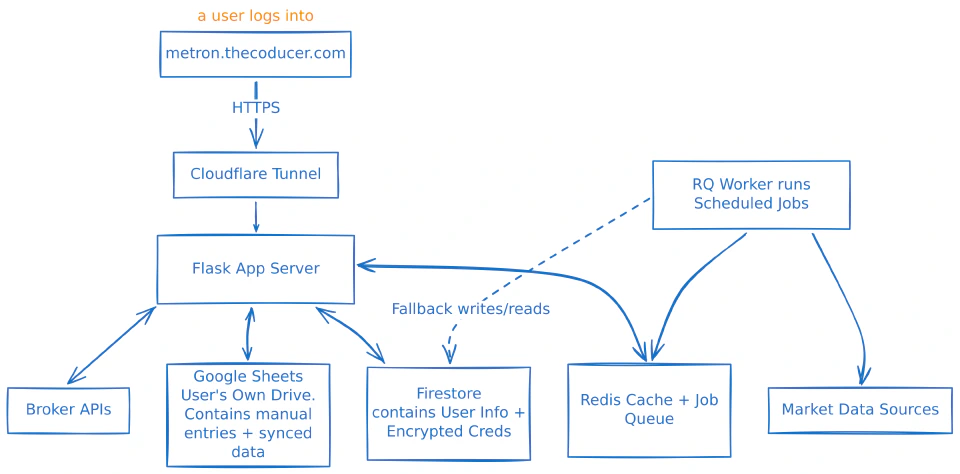
The single-worker model is deliberate. It maintains per-user in-memory LRU caches for portfolio data and Google Sheets data. Multiple workers would mean independent cache copies with no synchronisation — a problem that would need a shared caching layer to resolve. For a handful of users, that complexity is unjustified. Eight threads give me the concurrency I need.
How the dashboard data gets assembled?#
When a user opens the dashboard, the system pulls together data from multiple sources, merges and enriches it with live market prices, computes P&L metrics, and serves the result.
If a user has connected a broker account — currently Zerodha via KiteConnect — the system fetches their holdings automatically. This data lands in a per-user LRU cache and gets served from cache on subsequent requests without hitting the broker API again.
For holdings that cannot be fetched through an API — physical gold, fixed deposits, positions in other brokers — users add them manually through the dashboard, with autocomplete search powered by instruments and MF schemes data cached in Redis. Manual entries are persisted directly to the user’s Google Sheet.
The data builders module is where the two streams converge — merging broker-fetched and manual holdings, deduplicating by identity keys like trading symbol and account name, enriching each position with the latest traded price or NAV from Redis, and computing P&L across all asset classes.
A background sync writes broker-fetched data back to the user’s Google Sheet after each successful fetch. This serves as a fallback — if the broker session expires or the API goes down, Metron falls back to the last-synced sheet data so the dashboard never shows empty. The sync is non-blocking and only touches rows that originated from the broker.
Importing mutual fund data from CAMS#
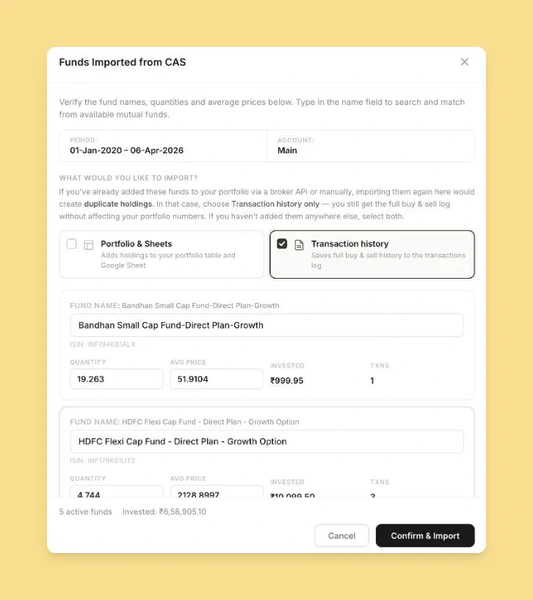
Metron supports CAMS Consolidated Account Statement parsing for importing mutual fund holdings and transaction history. The user uploads a password-protected CAS PDF, the system extracts scheme-level holdings and transactions, and a preview is shown for verification before anything is persisted. Only after confirmation does the data get written to their Google Sheet.
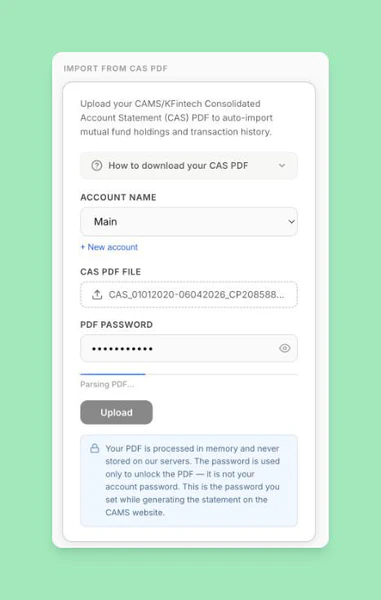
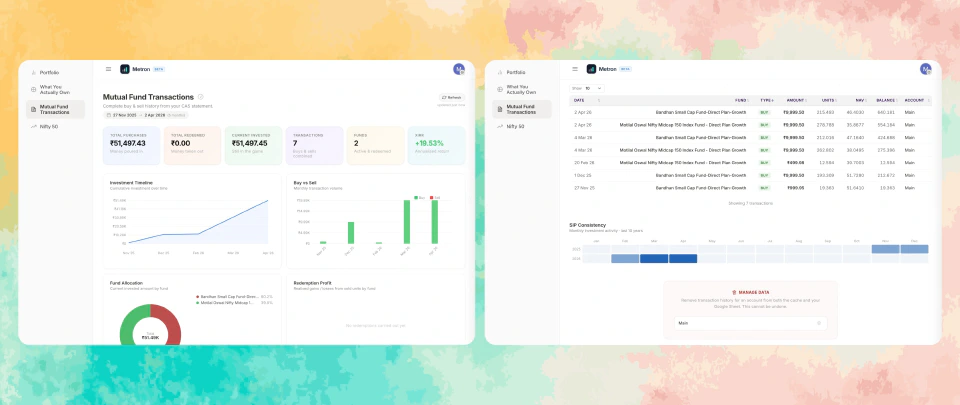
Take a look at how mutual fund transactions dashboard looks like.
NSDL and CDSL CAS parsing is planned for the future — it would let people import their entire demat holdings just by uploading a statement. No API keys, no broker authentication, no setup friction.
What you actually own?#
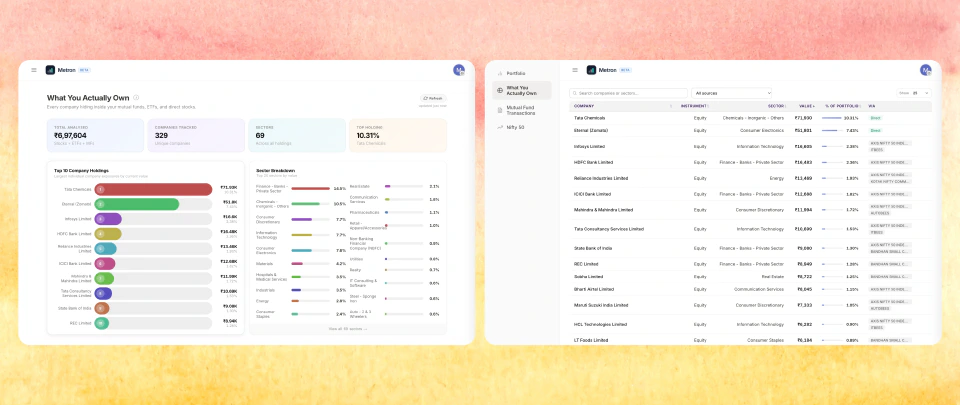
Holdings data alone does not tell the full story. Metron has a dedicated exposure analysis page that answers a more important question: across all your stocks, ETFs, and mutual funds combined, what companies and sectors do you actually have concentration in?
The API layer aggregates holdings across every asset class — direct equity, ETFs, and the underlying holdings of every mutual fund in your portfolio — and groups them by company and sector. If you hold Infosys stock directly, an ETF with 8% Infosys weight, and two mutual funds that each hold Infosys, the page surfaces your total Infosys exposure as a single number and as a percentage of your overall portfolio. The same logic applies to sectors.
The hard part is that the same company appears under wildly different names depending on the data source. Mutual fund portfolio disclosures are not standardised. One source might report "HDFC Bank Ltd.", another "HDFC Bank Limited", a third the truncated "HDFC BANK", and your direct equity shows it as the exchange symbol HDFCBANK. Sector labels are equally inconsistent — "Finance - Banks - Private Sector" and "Banking" are the same thing to a human, but not to a string comparator.
Simple fuzzy matching cannot handle all of this reliably — it breaks on abbreviations, truncations, and reordered words simultaneously. So Metron uses all-MiniLM-L6-v2, a compact sentence transformer that encodes company names into 384-dimensional vectors and clusters them by cosine similarity. It runs via ONNX Runtime on CPU — no PyTorch, no GPU. The model loads once at startup and inference is fast enough to not matter.
Before encoding, names are preprocessed: date suffixes like (24/11/2011) and legal suffixes like Ltd, Limited, Corp are stripped so the model focuses on the semantically meaningful part. The clustering uses complete-linkage — two clusters only merge when every cross-cluster pair exceeds the 0.75 threshold — which prevents transitive chain reactions where "State Bank of India" would chain through "Bank of India" into "Indian Bank" and wrongly collapse three separate companies. The same mechanism runs on sector labels with a lower threshold of 0.60.
It is a legitimately interesting use of ML for a problem that looks deceptively simple. The data quality issues are real. An embedding-based semantic clustering approach handles them far more robustly than any hand-crafted normalisation logic could.
Scheduled jobs and gathering market data#
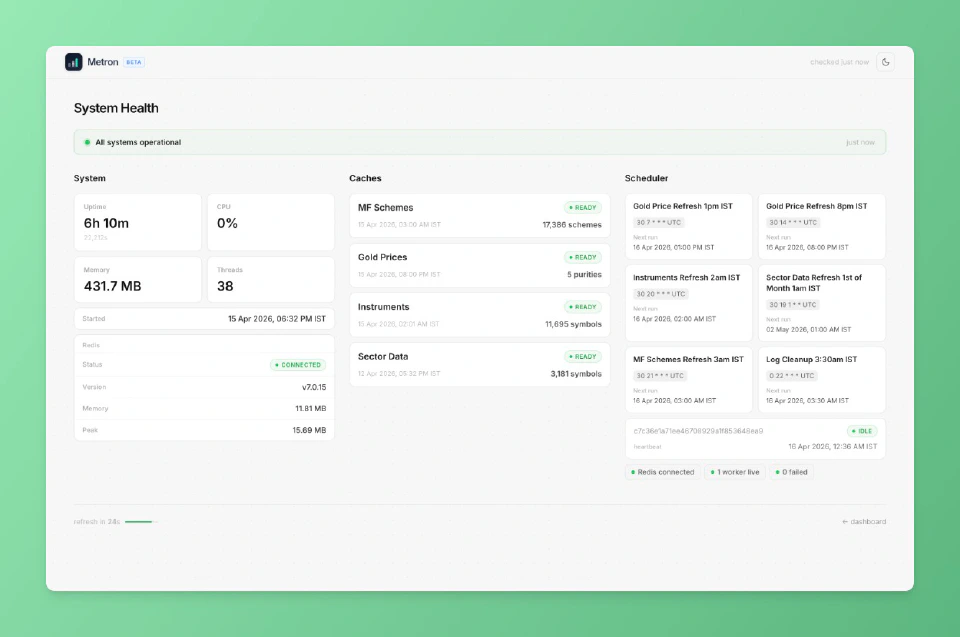
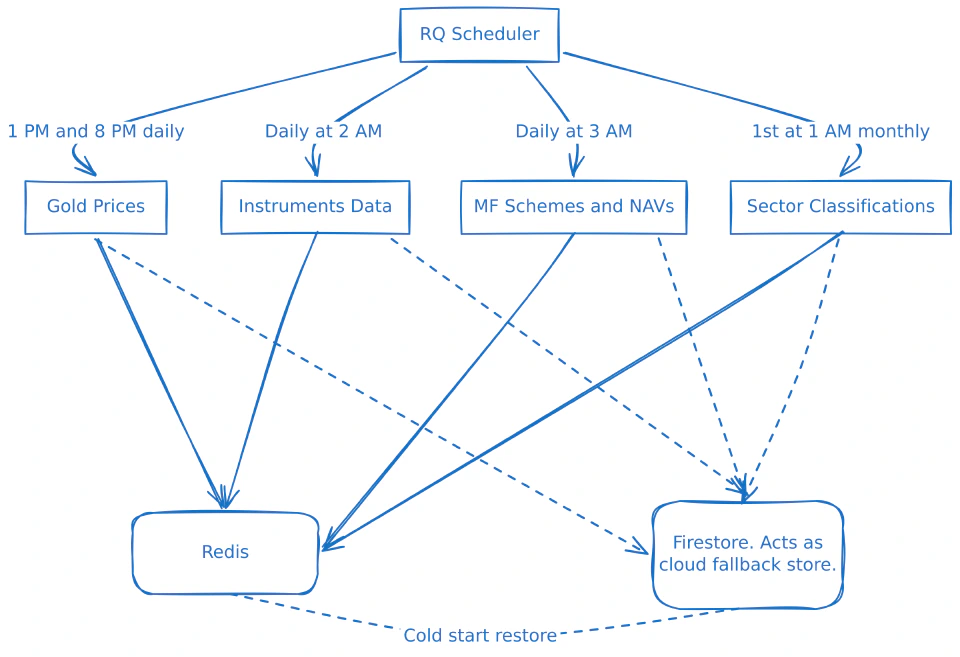
Portfolio data is user-specific and fetched on demand, but market data is global and changes on predictable schedules. Fetching it on every request would be wasteful, so Metron runs scheduled background jobs through Redis Queue to keep this data fresh in cache.
Why Redis Queue Instead of a Scheduler Library#
I initially used a Python scheduler library, and it worked fine — until the server restarted and all scheduled jobs vanished. In-process schedulers keep state in memory; when the process dies, everything has to be re-registered from scratch.
Redis Queue with AOF persistence solves this. Job schedules live in Redis and persist to disk — when the server restarts, the RQ worker picks up right where it left off. The RQ Dashboard gives me a web interface to inspect what is running, what failed, and what is scheduled next.
Handling Cold Starts Gracefully#
What happens when Redis itself starts empty? Every scheduled job writes its results to both Redis and Firestore as a fallback. On a cold start, Metron loads the last-known data from Firestore into Redis before serving the first request.
Data Structures That Serve the UX#
Market data in Redis is structured around access patterns. Instrument data and MF schemes are stored as sorted lists alongside HASHes, enabling O(log n) prefix matching via binary search — when someone types “Rel”, the system finds “Reliance Industries” through a bisect on a pre-sorted key list rather than scanning thousands of entries. Sector data uses HASHes for O(1) per-symbol lookups. These are not premature optimisations — they are the difference between a search bar that responds as you type and one that lags on every keystroke.
Security and Privacy — Built into the Architecture#
Security was a first-class concern from the start.
Two tiers of encryption protect different credential types. Broker API credentials are encrypted using a key derived via HMAC-SHA256 from both a server-side secret and the user’s PIN — a database breach alone is not enough to decrypt them. Google OAuth tokens use server-side encryption since the server needs to refresh them automatically without user input.
The PIN is never stored — only an encrypted sentinel value exists in Firestore. A server restart wipes the in-memory PIN, forcing re-entry before broker APIs can be accessed again. Brute-force protection applies progressive lockouts that escalate with each failed attempt.
Additional hardening: session cookies are HTTPOnly, SameSite=Lax, and Secure-flagged in production. API endpoints verify request origin via a custom header and the browser’s Sec-Fetch-Mode, blocking direct browser navigation to API URLs.
The most important privacy property is architectural: user portfolio data never lives on the server. It resides in each user’s own Google Drive, processed transiently but never stored. If Metron disappears tomorrow, every user’s data survives intact. Privacy by architecture, not by policy.
Building with AI — The Honest Review#
Claude wrote approximately 95% of Metron’s codebase. My role was architect, reviewer, and decision-maker. Claude handled everything from responsive layouts and dark/light theming to sortable tables and mobile UI in vanilla HTML/CSS/JS — for someone who struggles with CSS, this was transformative.
Spec-Driven Development#
Before any implementation began, I wrote detailed specs for every major feature — requirements, data flow, edge cases, API contracts. Submitting a spec before asking Claude to write a single line made a measurable difference. Without one, Claude made plausible but wrong assumptions about data structures, module boundaries, and error handling. With one, edge cases were handled from the start and rework cycles were noticeably shorter.
Where AI Fell Short#
- Project structure — functions landed in the wrong files, responsibilities leaked across modules, and separation of concerns was not prioritised. The codebase had coherence issues that an experienced engineer would have caught early.
- Inconsistent instruction adherence — I maintained a detailed CLAUDE.md with coding standards, naming conventions, and error handling patterns. Claude followed them sometimes and ignored them other times. I could never fully trust a finished piece of work without reviewing it line by line.
- Code quality degraded with scale — as the codebase grew, dead code accumulated, comments described refactored-away behaviour, and duplicate utility functions appeared across multiple files. The entropy was gradual but real.
The Fix — Guardrails Over Goodwill#
I stopped expecting Claude to maintain quality through good intentions and started enforcing it through tooling.
The development loop became non-negotiable: write code → run Ruff (linter + formatter), Pyrefly (type checker), and djlint (template linter) → fix everything flagged → done.
Since Claude is good at reading error output and fixing what it is told to fix, this loop worked remarkably well. Ruff caught unused imports and bug patterns. Pyrefly caught type errors and missing null checks. Dead code could not survive.
AI does not need good coding habits — it needs good guardrails. Linters and type checkers are more essential when AI writes the code, not less — AI will not catch its own regressions the way an experienced developer senses something is off.
What I Learned#
Tradeoffs only make sense in context. Google Sheets as a database, a single Gunicorn worker, hosting on a spare PC — all of these sound wrong in the abstract and were exactly right for the constraints I was operating within. Understanding your actual constraints, not aspirational ones, is what separates pragmatic engineering from resume-driven architecture.
Unused complexity is debt with interest. Every component you add is something that can fail, needs monitoring, and adds cognitive load at midnight. Add complexity only when the problem demands it.
Write specs before you write code. Specs are the highest-leverage artefact you can produce when working with AI. They give AI a clear contract, reduce ambiguity-driven rework, and give you a baseline to review the output against. Without them, you are asking AI to guess your intent and it will guess wrong in ways that are expensive to fix later.
AI is a force multiplier, not a substitute for engineering judgment. Strong fundamentals are what let you direct AI toward sound architecture, catch insecure choices, and recognise when the codebase is drifting before it becomes unmanageable. Without that foundation, AI will confidently produce software that works today and becomes a maintenance burden tomorrow and you will not notice until the damage is done.
Invest in tooling, not hope. Linters, formatters, and type checkers matter more when AI writes the code, not less. Automated enforcement does not get tired or inconsistent. Make the wrong thing impossible to ship.
Details are not optional. Loading indicators, import previews, progressive rate limiting, graceful degradation. None of these appear in a requirements doc, but they imporve user experience massively. Polishing edge cases is part of the engineering work.
Working with AI is like having a fast, tireless junior engineer who can write any feature you ask for, often with creative approaches you hadn’t considered. But who will not push back when something will be painful to maintain, will not notice when module boundaries are leaking, and will not flag when three functions are doing the same thing across different files. That instinct for long-term code health is still a human skill, and it is the most important one to bring to AI-assisted development.
Metron does exactly what I set out to build — a single view of all my investments, with real P&L numbers, while keeping every user’s data in their own hands. Building it taught me more about AI-assisted development than any article or talk could. The only way to form a real opinion is to build something real with it and see for yourself.